WhatsApp
Productized Software Solutions

Software That Already Exists, Configured For How You Work

Buying business software usually means choosing between a product that nearly fits and a custom build that takes a year. Our platforms sit between the two. The system is already built and running. The configuration, data and workflows are yours.

For business owners, finance leaders and operations teams evaluating business management software for their organization.

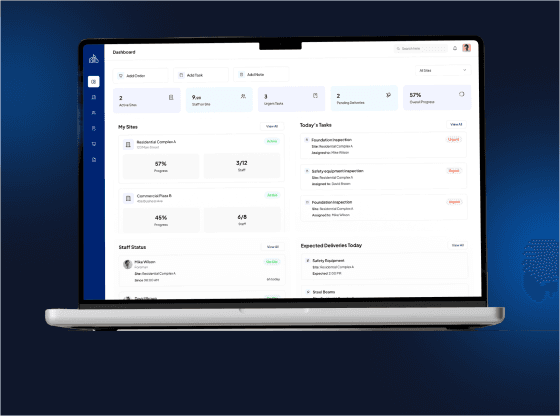
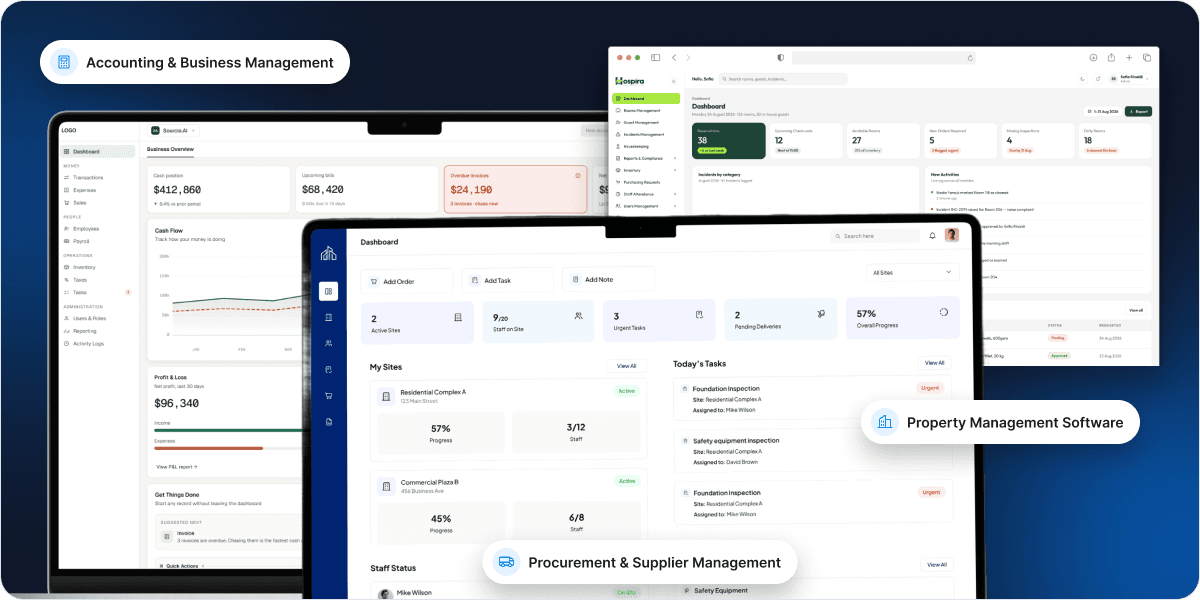
Accounting, property management and procurement platform dashboards

Trusted by Leading Enterprises

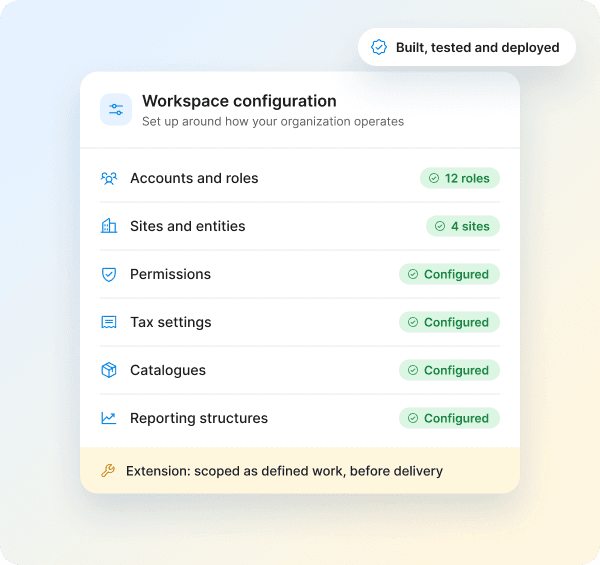
Workspace configuration covering accounts, roles, sites, permissions, tax settings, catalogues and reporting
The Model

Built platforms, configured for your organization

Each platform in this range is a complete, working system that has been built, tested and deployed. You are not commissioning development and waiting to see what arrives. You can see the software, use it in a demonstration, and judge whether it fits before committing anything.

What varies between clients is configuration rather than code. Your accounts, sites, roles, permissions, tax settings, catalogues and reporting structures are set up around how your organization actually operates. Where a genuine gap exists, extension is scoped as a defined piece of work rather than discovered halfway through a project.

  • Built, tested and deployed before you buy
  • Configuration rather than code
  • Extension scoped as defined work
Buy, Build or Configure

Three Ways to Get Business Software, and What Each One Costs You

Most organizations consider two options and pick the least bad one. There is a third.

Off the Shelf Software

The right answer when your processes are standard and a product covers them. Paying to recreate something you could subscribe to tomorrow is a poor use of budget, and we will say so.

Time to live
Immediate
Fit to your process
You adapt to it
Cost shape
Per user, forever
Risk
Low, but workarounds accumulate
Changing it later
Wait for the vendor
Our model

Configured Platform

Wins when standard products force workarounds, when per user pricing scales badly against your margins, or when you need the system working this quarter. You see the software before you buy it.

Time to live
Weeks
Fit to your process
Configured around you
Cost shape
Implementation plus licence
Risk
Low, you see it before buying
Changing it later
Extension scoped as work

Custom Build

Justified when the software is your competitive advantage, or your model is genuinely unlike anyone else's. We do that work too, through our development services.

Time to live
Months to years
Fit to your process
Exactly as specified
Cost shape
Large upfront, then maintenance
Risk
Highest, nothing exists until it does
Changing it later
Your development team
What You Avoid

The Two Failure Modes in Business Software Purchasing

Failure mode 01

Purchasing a product and creating a process.

The platform covers most of what you need. The rest is absorbed by your team, and nobody measures the cost.

  • Gaps absorbed manually

    Workarounds become part of the job.

  • Spreadsheets appear alongside the system

    A shadow process runs next to the software.

  • One person becomes the workaround expert

    Knowledge concentrates and becomes a risk.

  • The hours spent compensating go unmeasured

    So the software is counted as a success.

Failure mode 02

Commissioning a build and waiting

The project is specified, budgeted and started before anyone has used the thing it describes.

  • Requirements shift after kickoff

    What was written no longer matches the need.

  • Scope grows as gaps are discovered

    Budgets and timelines move with it.

  • The first working version arrives late

    Often much later than planned.

  • The spec predates any real use

    The root cause of most overruns.

The third option

A configured platform avoids both

Because the software exists before you commit.

  • You evaluate what is actually there
  • Tested against your own processes
  • Not a feature list or a proposal
Our Platforms

Explore the platforms available

Accounting and Business Management Software
Platform

Accounting and Business Management Software

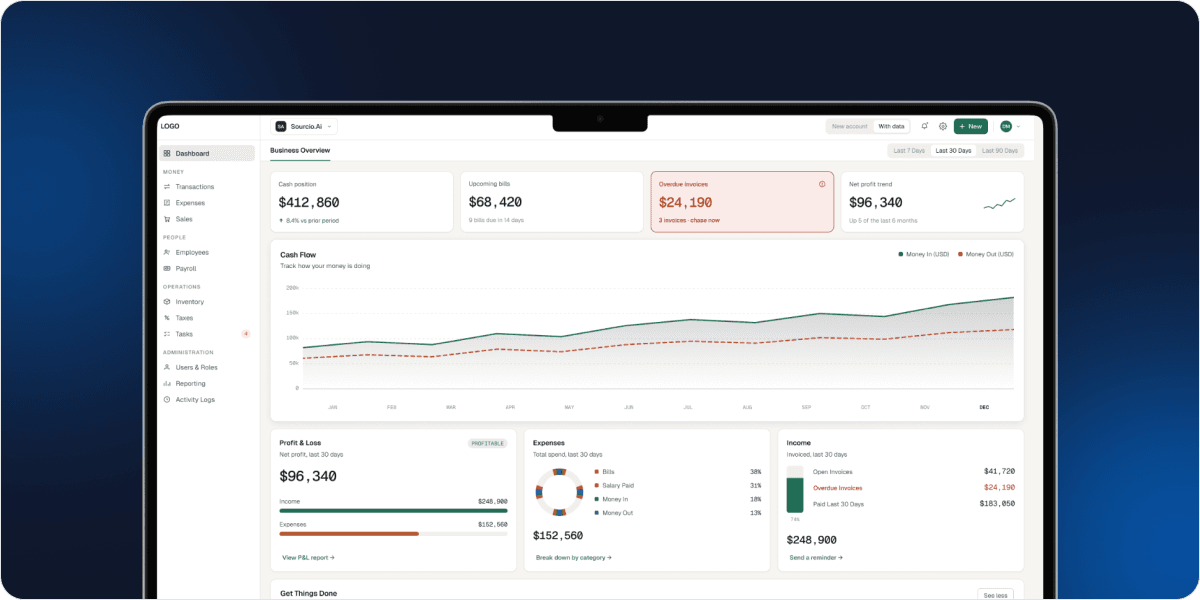
Financial management, sales, purchasing and inventory in one workspace. Invoices, estimates, expenses, supplier bills, bank transaction records, chart of accounts, stock and warehouse records, purchase orders, payroll configuration, tax settings and financial reporting including Profit and Loss, Balance Sheet, Trial Balance, General Ledger and Cash Flow.

For finance teams and business leaders who need operational records and reporting in the same system.

See the accounting and business management platform
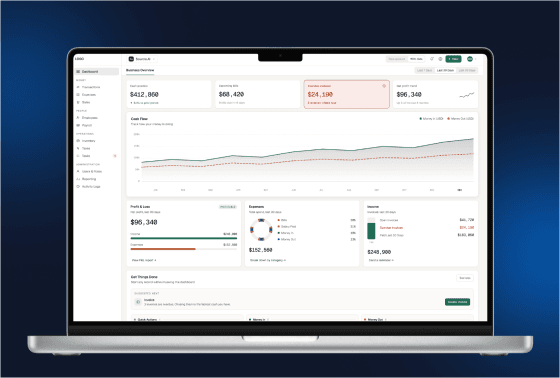
Procurement and Supplier Management Platform
Platform

Procurement and Supplier Management Platform

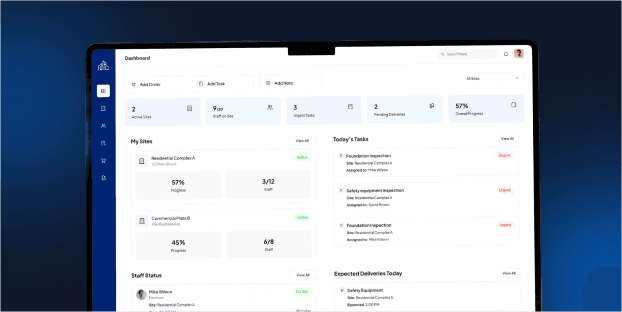
Multi site procurement with supplier quoting, savings tracking and full order lifecycle management. Site based access control, central product catalogue with variations and bulk pricing, RFQ and quote comparison, automatic purchase order generation, a supplier portal, delivery sign off, returns, disputes and a procurement savings engine measuring the difference between winning and highest quotes.

For organizations buying across multiple sites where supplier pricing varies and savings are currently invisible.

See the procurement and supplier management platform

Not seeing what you need

Where neither platform fits, our development teams build custom software and extend existing systems. The honest answer is sometimes that a product you already use, properly configured, would serve you better than anything new.

Proven in Production

These Platforms Exist and Have Been Deployed

Neither of these is a prototype or a concept waiting for a first client. Both have been built, tested and put into live use, which is the reason you can evaluate working software rather than a proposal.

Accounting and business management
Case studyLive in production

Accounting and business management

Our all in one accounting work brought invoicing, expenses, supplier records, inventory and financial reporting into a single workspace for a business running those functions across disconnected tools.

  • Invoicing
  • Expenses
  • Supplier records
  • Inventory
  • Financial reporting

The platform available here is built on that work.

See the accounting case study
Procurement and supplier management
Case studyLive in production

Procurement and supplier management

Our procurement platform work covers multi site ordering, supplier quoting and comparison, automatic purchase order generation, delivery sign off, returns and a savings engine that measures winning quotes against the highest received.

  • Multi site ordering
  • Supplier quoting
  • Auto PO generation
  • Delivery sign off
  • Returns
  • Savings engine

The platform available here is built on that work.

See the procurement case study
Every platform looks capable in a feature list. The difference is whether anyone has used it when the data was messy and the deadline was real.
You are looking at software that has survived contact with real operations, real suppliers and real financial records.
How It Works

From demonstration to live system

1

Demonstration

Walk through the working software with your team and test it against your actual processes.

2

Fit review

Identify what the platform covers, what needs configuration and what would require extension.

3

Scope and proposal

A defined scope covering configuration, data migration, integration and any extension work, with commercial terms.

4

Configure

Accounts, roles, permissions, catalogues, sites, tax settings and reporting structures set up around your organization.

5

Migrate and integrate

Existing data brought in and verified, and connections made to the systems you continue to use.

6

Train and launch

Your team trained on the workflows they will use, with a phased rollout where it reduces risk.

7

Support and extend

Ongoing support, with further development scoped as defined work when requirements change.

What to Ask During Evaluation

The questions that determine whether this works

Buying configured software goes wrong in predictable ways. These are the questions worth asking us, and worth asking any vendor.

Which of my requirements does the platform already cover?

Ask for a demonstration against your own processes rather than a generic walkthrough. A feature list tells you what exists, not whether it works the way you need.

What needs configuration and what needs development?

These have very different timelines and costs. The distinction should be explicit in the proposal rather than resolved during delivery.

What happens to our existing data?

Migration scope, what transfers cleanly, what needs restructuring and what will not come across at all. This is routinely underestimated.

Which systems does it need to connect to?

Integration is usually the longest lead item. It should be scoped against your actual systems rather than assumed from a list of supported connectors.

Who controls access to what?

Role and permission models vary considerably between platforms. If your organization needs finance data restricted from operations, or site managers limited to their own sites, confirm it rather than assume it.

What does changing it later involve?

Requirements change. Understand how extension works, what it costs and how long it takes, before you are dependent on the system.

Who It Is For

Organizations making a business software decision

Business owners and managing directors

Business owners and managing directors

Decision makers who need visibility across financial and operational activity without assembling it from separate systems.

Finance leaders and accounting teams

Finance leaders and accounting teams

Teams evaluating invoicing, expense control, bank records, reporting and permissions in one environment.

Operations and procurement leaders

Operations and procurement leaders

People managing purchasing, suppliers, stock or multi site operations where current tooling does not reflect how work actually happens.

Multi site and multi entity organizations

Multi site and multi entity organizations

Businesses operating across locations where consolidated visibility and site level control both matter.

Access and Governance

Control Over Who Sees and Changes What

Role based access on both platforms

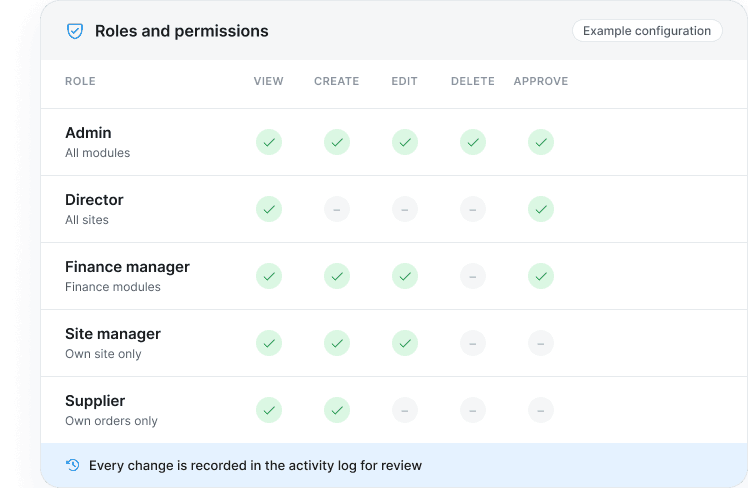
Permissions are configured across modules, covering what each role can view, create, edit, delete and approve. Your structure decides the rules, not the software.

  • Module level permissions

    Set per role for every part of the platform.

  • Site and entity restrictions

    Supported where the platform includes them.

  • Activity recorded for review

    Changes are logged so they can be audited.

Example roles and permissions matrix showing view, create, edit, delete and approve rights per role
Before you commit

Confirm during technical discovery

For any business software procurement, validate these against your proposed deployment rather than assuming them from a feature list.

  • Security model
  • Hosting options
  • Backup approach
  • Data residency
  • Regional compliance
  • Audit and retention
Product Fit

Is a configured platform right for your organization?

Use these criteria to judge whether this model suits you.

  • Standard products nearly fit but not quite

    Your team has absorbed workarounds, spreadsheets or manual steps to cover the gaps.

  • Per user pricing is becoming a problem

    Licence costs scale against your headcount or margins in a way that no longer makes sense.

  • You need it working this quarter

    A custom build's timeline does not match the problem's urgency.

  • You want to see it before you buy it

    The largest risk in custom development is committing to something that does not exist yet.

  • Your requirements are specific but not unique

    Unusual enough that generic products struggle, not so unusual that everything must be built from nothing.

  • You can define your rollout requirements

    Your team can specify users, data migration, integrations and reporting expectations.

Frequently Asked Questions

Questions buyers ask about configured platforms

A platform that has already been built, tested and deployed, which is then configured around your organization rather than developed from scratch. You evaluate working software before committing, and what varies between clients is configuration rather than code.
Subscription products are configured within the limits the vendor allows and change only when the vendor decides. These platforms are configured more deeply around your structure and processes, and can be extended as defined work when a genuine gap exists.
The software already exists. You can use it in a demonstration and judge the fit before committing, which removes the main risk in custom projects, where the first working version arrives after the budget is spent.
Weeks rather than months, depending on configuration depth, data migration volume and integration requirements. Migration and integration are the variables, not the software itself, and both are scoped before work starts.
Yes, scoped as defined development work with its own timeline and cost. The distinction between configuration and extension should be explicit in the proposal rather than resolved during delivery.
Yes, and it is scoped during the fit review. What transfers cleanly, what needs restructuring and what will not transfer should be established before implementation rather than discovered during it.
We will say so. Our development teams build custom software, and sometimes the honest recommendation is that a product you already use, properly configured, serves you better than anything new.
Book a Demo

See The Software Before You Decide

JOB SUCCESS

99%

JOB SUCCESS

WORKING HOURS

15000+

WORKING HOURS

HAPPY CLIENTS

500+

HAPPY CLIENTS

PROFESSIONAL TEAM

60+

PROFESSIONAL TEAM

GoogleUpworkGoodFirmClutch

Let’s bring your vision to life

0/2000

Attachments