
Manage Accounting, Sales and Inventory in One Business Platform
Bring invoices, expenses, bank transactions, suppliers, customer accounts, stock and financial reports into one workspace, so finance and operations teams manage daily records while leaders review the numbers behind their decisions.
For business owners, finance leaders and operations teams evaluating accounting software
Trusted by Leading Enterprises
One Workspace for Your Financial and Operational Work
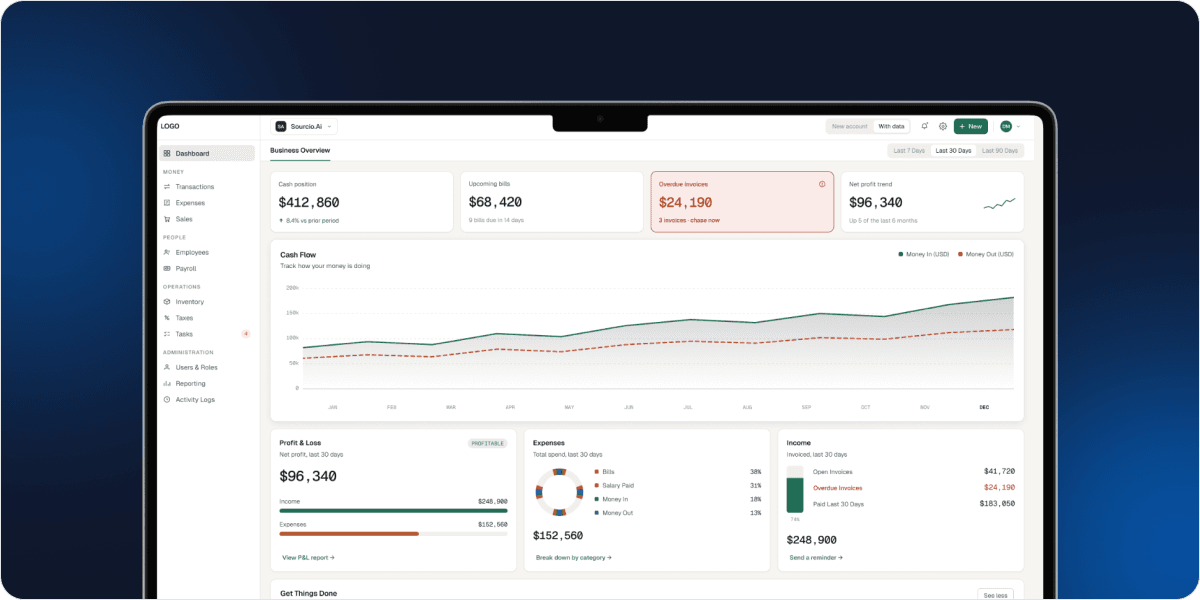
This platform brings sales documents, expenses, customer and supplier information, transactions, financial accounts, inventory and reporting into one application, with a dashboard showing income, expenses, profit and loss and invoice status.
Beyond accounting entries, it includes inventory and warehouse records, purchase orders, employee details, payroll setup, task assignment, tax settings and role-based access.
- Sales, spending and stock in one application
- Dashboard views of income, expenses and P&L
- Role-based access for finance and operations
An Invoice Shows What You Billed. It
Does Not Explain the Whole Business.
Income and outstanding balances are hard to follow
Sales documents, open invoices, overdue balances and customer details need a consistent record.
Spending lacks context
Supplier bills, taxes, expense categories, payment methods and bank transactions are hard to review separately.
Purchasing and inventory sit outside finance
Stock levels, warehouses and purchase orders affect what the business needs to buy and monitor.
Reporting becomes manual consolidation
Finance managers need dependable views of profit and loss, cash flow, accounts and tax activity.
Give Finance Teams the Records They Need
and Leaders the Visibility They Expect
See the business picture beyond one report.
Dashboard summaries of income, expenses and profit and loss, alongside balance sheet, general ledger, cash flow and period comparisons.
Manage money in and money out with clearer records.
Prepare estimates, invoices and receipts; record bills, expenses, cheques and card transactions with line items and tax fields.
Bring purchasing and stock into the discussion.
Maintain products, stock levels, warehouses and purchase orders so inventory is reviewed alongside wider business activity.
Control who can access and update information.
Invite team members, define roles and module-level actions, and review recorded events in the activity log.
Explore the Accounting and Operations
Modules Your Organization Can Use

Business dashboard and financial overview
Use date filters to review cash-flow visualization, profit-and-loss summaries, expenses by category, income and invoice-status indicators. A quick-actions panel provides entry points for common customer, supplier, invoice and expense tasks.
From Setup to Financial Review
See How the Modules Support Real
Business Processes
Use these business scenarios to test how sales, spending, stock and accounting records work together in the platform.
From customer sale to invoice follow-up
Sales documents, statuses and receipts stay connected to each customer record.
Step 01
Select customer
Profile and billing details ready
Step 02
Prepare estimate or invoice
Line items and tax added
Step 03
Issue and track status
Open and overdue invoices visible
Step 04
Follow up on overdue
Balances kept current
Step 05
Payment and receipt recorded
Sales records updated
- Every document linked to the customer
- Full invoice and payment history
- Visible to authorized users
Designed for Organizations Making a
Business Software Purchase

Business owners and managing directors
For decision-makers who want a clearer view of income, expenses, outstanding invoices and the records behind business activity.

CFOs, finance managers and accounting teams
For teams assessing invoicing, expense control, bank records, chart of accounts, reporting and permissions in one environment.

Product, distribution and inventory-led businesses
For organizations that need financial records alongside stock visibility, warehouses, purchase orders and product information.

Operations, IT and procurement decision-makers
For people evaluating user access, software fit, existing systems, rollout requirements and the scope of a commercial implementation.
Give the Right People Access to the
Right Business Records
User invitations and role configuration control who can view, create, edit, delete and approve records by module. Confirm security, hosting, bank connectivity, backup and compliance needs during technical discovery.
Team invitations and roles
Invite team members and define roles for finance, operations and management users, rather than sharing one administrative login.
Permissions matrix
Configure viewing, creating, editing, deleting and approving actions by supported module.
Activity log
Review recorded events with action, entity, description, actor and time.
Workspace and user management
Workspace controls and user management screens can be reviewed as part of the buying process, so access rules are clear before rollout.
Security and hosting review
Confirm the security model, hosting options, bank-connection availability and backup approach for the proposed deployment during technical discovery.
Compliance and retention
Validate regional compliance, audit and retention requirements rather than assuming them from the feature list.

Is This Accounting Software Right for Your Business?
Use these practical criteria to determine whether the platform fits the way your organization operates.
You manage both sales and spending
Customer invoicing, supplier bills, expenses and accounts in one coordinated workspace.
Reporting is part of the buying decision
Profit and Loss, Balance Sheet, Trial Balance, General Ledger, Cash Flow and tax reports.
Stock or purchasing matters
Products, warehouses, reorder thresholds or purchase orders that need structured records.
Several people need different access
Finance, operations and management users with defined permissions, not one shared login.
You can define your rollout requirements
Users, data migration, bank connectivity, tax jurisdiction, integrations and reporting expectations.
Questions Buyers Should Ask Before
Selecting Accounting Software

99%
JOB SUCCESS

15000+
WORKING HOURS

500+
HAPPY CLIENTS

60+
PROFESSIONAL TEAM