


Manual document entry is slowing work.
Teams repeatedly read, copy, check and rekey information from PDFs, scans, images, emails or forms.


Trusted by Leading Enterprises
OCR converts text from scans or images into machine-readable data. Document AI goes further by understanding document types, layouts and tables, extracting and validating fields, handling exceptions, and integrating data into business systems. IDP combines these capabilities with rules, human review, and automation.
AB Ark builds end-to-end document workflows, covering intake, cleanup, classification, OCR, data extraction and validation, human review, integrations, deployment, and monitoring.

Teams repeatedly read, copy, check and rekey information from PDFs, scans, images, emails or forms.
Layouts, suppliers, languages, page order, tables or image quality change across the real intake.
Extracted values need cross-field rules, master-data checks, totals, tolerances or reconciliation before posting.
People must confirm uncertain or high-impact fields without reprocessing the entire document manually.
Documents arrive through one channel and approved results must update an ERP, CRM, DMS, claims platform or custom workflow.

Text is readable but fields, tables, document types, line items, routing or production visibility remain unreliable.

Focused question answering over one well-managed knowledge collection.
Best suited to
Recognizes printed or handwritten text in images and scanned pages.
Key proof required
Digitization, searchable archives and text capture where structure is secondary.
Important limitation
Readable text does not automatically become accurate business fields.
Capability
Focused question answering over one well-managed knowledge collection.
Best suited to
Recognizes printed or handwritten text in images and scanned pages.
Key proof required
Digitization, searchable archives and text capture where structure is secondary.
Important limitation
Readable text does not automatically become accurate business fields.

Capture suppliers, invoice numbers, dates, purchase orders, taxes, totals and line items; validate the data and route mismatches before ERP posting.

Extract merchant, date, currency, tax, total and item details for review, policy checks and expense workflows.

Read orders, packing lists, bills of lading, proof-of-delivery files and goods-receipt documents to support reconciliation and exceptions.

Classify claim packets, extract relevant fields and route incomplete, uncertain or high-impact cases to accountable reviewers.
Capture data from identity and onboarding documents for downstream checks. Identity verification, authenticity and fraud decisions require separate approved controls.

Identify document types, clauses, parties, dates, obligations and structured facts for review, search and workflow support.

Extract authorized information from referrals, forms, statements and supporting documents with privacy and human-review controls matched to the use case.

Process customs forms, commercial invoices, manifests, shipping instructions and certificates across multi-page, multi-format workflows.

Classify incoming forms and correspondence, extract key data and route each item to the correct queue, case or system.

Convert scanned collections into searchable, indexed and quality-checked content with metadata and traceable source files.

Parse, structure and enrich documents for permission-aware search, knowledge assistants and retrieval-augmented generation systems.
Extract specifications, identifiers, components, tables and reference data from manuals, drawings and operational documentation.
Capture suppliers, invoice numbers, dates, purchase orders, taxes, totals and line items; validate the data and route mismatches before ERP posting.
Extract merchant, date, currency, tax, total and item details for review, policy checks and expense workflows.
Read orders, packing lists, bills of lading, proof-of-delivery files and goods-receipt documents to support reconciliation and exceptions.
Classify claim packets, extract relevant fields and route incomplete, uncertain or high-impact cases to accountable reviewers.
Capture data from identity and onboarding documents for downstream checks. Identity verification, authenticity and fraud decisions require separate approved controls.
Identify document types, clauses, parties, dates, obligations and structured facts for review, search and workflow support.
Extract authorized information from referrals, forms, statements and supporting documents with privacy and human-review controls matched to the use case.
Process customs forms, commercial invoices, manifests, shipping instructions and certificates across multi-page, multi-format workflows.
Classify incoming forms and correspondence, extract key data and route each item to the correct queue, case or system.
Convert scanned collections into searchable, indexed and quality-checked content with metadata and traceable source files.
Parse, structure and enrich documents for permission-aware search, knowledge assistants and retrieval-augmented generation systems.
Extract specifications, identifiers, components, tables and reference data from manuals, drawings and operational documentation.
Process only the documents and fields the use case needs and apply handling rules for personal, confidential, regulated or restricted information.

Authenticate upload channels and connectors, validate file types, isolate untrusted content and scan files according to the client's security requirements.

Use appropriate encryption, secrets management, network boundaries, tenant isolation and access control across source files, derived images, text and structured outputs.

Document where originals, intermediate files, prompts, model inputs, outputs, logs and review data are stored and how long each is retained.

When VLMs, LLMs or RAG are used, test hidden instructions, prompt injection, malicious links and content intended to influence downstream behavior.

Use approved business logic and accountable review for identity, eligibility, payment, compliance, safety or fraud-sensitive decisions.
Users, intake, document types, fields, validation rules, risk, baseline, systems, success measures and acceptance criteria.
Representative corpus analysis, quality and variation findings, language and handwriting scope, labeling needs and known gaps.
Field definitions, normalization rules, examples, edge cases, criticality and annotation guidance.
The agreed intake, preprocessing, classification, OCR, extraction, validation, review and routing capabilities.
Queues, source highlighting, correction controls, reason codes, escalation and audit behavior for exceptions.
Versioned samples, ground truth, metrics by document and field, thresholds, results and failure analysis.
APIs, events, connectors, environments, configuration, infrastructure guidance and release documentation.
Data flow, access, isolation, retention, logging, provider controls, incident handling and change management.
Agreed code, setup instructions, architecture notes, runbooks and knowledge transfer, with ownership defined in the engagement terms.
Dashboards, sampling, drift indicators, exception insights and prioritized quality, cost and workflow improvements.

We define how documents enter, how data is validated, who resolves exceptions and where approved results go before selecting technology.

We evaluate against a representative corpus and report results by document type, field and operating condition rather than relying on a universal accuracy claim.

Our scope can cover capture, OCR, AI extraction, validation, review interfaces, APIs, cloud infrastructure, integrations and operations.

We make uncertainty visible and create focused review paths for the fields and cases that need accountable judgment.

We compare conventional, cloud-managed, custom and generative approaches against quality, privacy, scale, latency, cost and maintainability.

We can begin with a document audit, improve an existing OCR workflow, build a focused POC or deliver and support an end-to-end production system.
AB Ark can work with suitable commercial APIs, cloud AI platforms and open-weight models. The recommendation should follow the use case rather than a preferred logo or a model leaderboard.


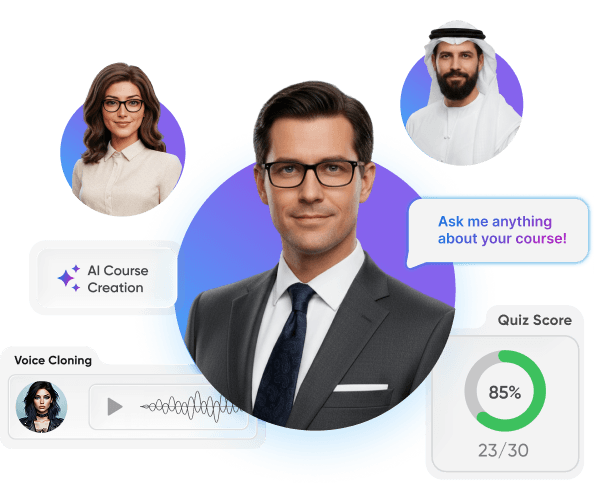
Vocaliv helps training institutes scale course delivery, reduce trainer workload, and launch new programs faster through AI-powered lesson planning, voice-based content creation, automated quizzes, and 24/7 student support.

Modern businesses lose countless opportunities simply because they cannot answer every incoming call. The AI Receptionist Platform solves this problem by providing businesses with a 24/7 intelligent voice assistant that answers calls instantly, manages bookings, and supports customers with natural conversations.

AI4Real automates real estate marketing with intelligent video creation. It combines AI, property data analysis, and templates for agencies to create professional videos instantly.

AB Ark transformed Eventas AI into a self-operating ecosystem, replacing manual chaos with a high-precision AI Command Center.

Modern businesses often rely on multiple disconnected systems to manage tasks, communication, data, and workflows. The All-in-One Business Platform consolidates these essential tools into a single, centralized ecosystem that simplifies operations and enhances productivity across teams.

QS Learning and Ab Ark built a Smart Online Academy, turning a traditional tutoring center into a seamless digital platform. With automated scheduling, an integrated classroom, and an SEO-optimized website, parents and students can easily find, book, and attend classes anytime.

CL Manager at Ebana

CEO at VYB Digital

CEO at Brightway

Director at SA Property Investors Network
CL Manager at Ebana
CEO at VYB Digital
CEO at Brightway
Director at SA Property Investors Network

JOB SUCCESS

WORKING HOURS

HAPPY CLIENTS

PROFESSIONAL TEAM