
Property Management Software for Multi-Property Operators
Manage reservations, occupancy, room readiness, maintenance, inspections, incidents, staff handovers and reporting across your accommodation portfolio, in one shared place for site teams and leadership.
For hotel groups, supported accommodation providers and multi-site housing operators
Trusted by Leading Enterprises
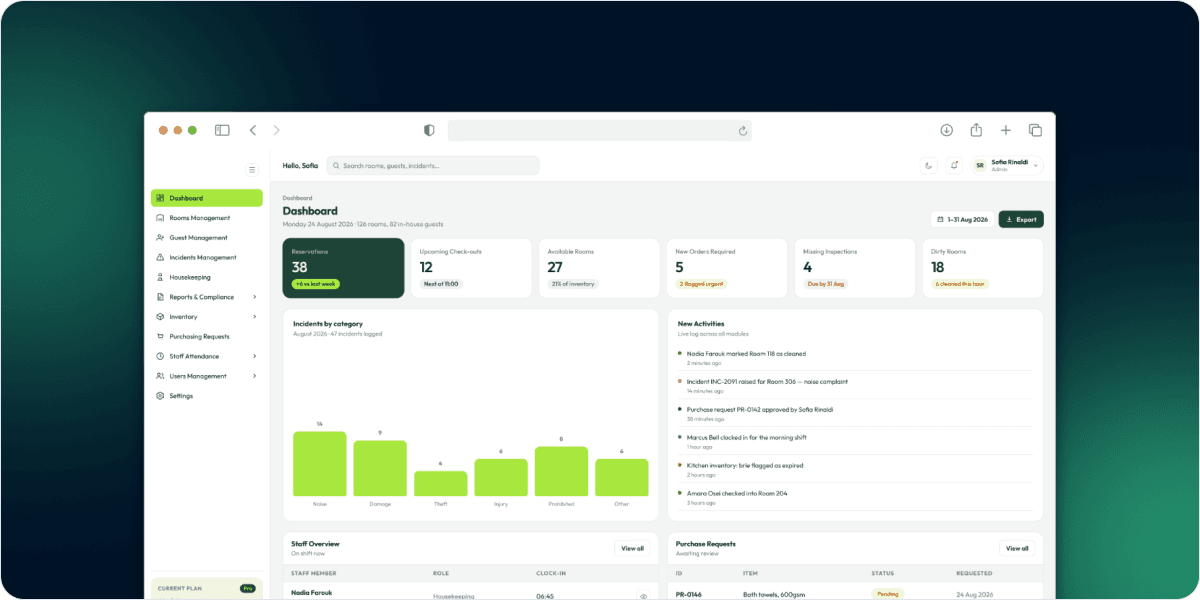
Unify Accommodation Operations in One System
This platform connects properties, rooms, guests, reservations and occupancy with the work behind every stay: housekeeping, maintenance, visitors, inspections, incidents, purchasing, staff activity and reporting. It is built for organizations that need more than a booking calendar.
Each property operates within its own context and permissions, while authorized administrators can review supported activity across sites.
- One system for rooms, people and work
- Separate context and permissions per property
- Cross-site review for authorized administrators
A Booking Confirms a Stay. It Does Not
Show Whether the Property is Ready.
Room readiness is difficult to verify
Occupancy, void periods, room moves and status changes need traceable records.
Operational follow-up is scattered
Incidents, inspections, housekeeping and maintenance each create work that needs a clear status.
Portfolio visibility depends on manual updates
Leaders need property-level information without chasing separate site reports.
Give Site Teams Operational Clarity and
Leadership Portfolio Visibility
Understand the status behind each room.
Review room status, occupancy, void periods, guest moves and unit history, with notes and related records available to authorized users.
Keep essential property work connected.
Coordinate housekeeping, maintenance, contractors, inspection actions and operational tasks alongside the rooms and properties they relate to.
Carry the right context between shifts.
Use staff schedules, attendance records, clock-in and clock-out checklists, and handover history to preserve context between teams.
Make review and oversight part of operations.
Maintain incidents, inspection reports, compliance documents and permission-controlled views as part of the daily workflow.
Explore the Operational Modules Your
Organization Needs
Properties, rooms and unit availability
Configure properties and administrators; organize rooms by type, tags and amenities; and monitor unit status. Manage bulk room updates, void transitions, unit requests and room history.
From Property Setup to
Portfolio-Level Reporting
See How the Software Handles Real
Operational Handoffs
These example journeys show how connected records support the actions teams take throughout an accommodation stay.
From checkout to a room that is ready again
Room transitions and void history explain what happened between stays.
Step 01
Guest checkout
Checkout notes saved
Step 02
Occupancy ends
Occupancy history updated
Step 03
Room enters void
Void period starts
Step 04
Prepared and inspected
Tasks and inspection logged
Step 05
Room available
Unit status updated
- Every step linked to the room
- Full history between stays
- Visible to authorized users
Built for Organizations Purchasing
Software for Property Operations

Hotel and accommodation group owners
For owners, managing directors and operations leaders evaluating one operating environment across several hotels or accommodation sites.

Supported accommodation and multi-site housing providers
For operators and service directors responsible for occupancy, incident records, inspections, compliance and controlled oversight across locations.
Operations, technology and procurement decision-makers
For portfolio directors, IT leads and procurement teams assessing permissions, module fit, reporting and bringing property workflows together.
Permission-Based Visibility Across
Your Properties and Teams
Properties work in separate contexts, supported by module-level permissions that determine who can view or act on particular information. Review security, hosting and information-governance requirements during procurement.
Separate property contexts
Each property operates within its own scoped workspace, so daily work and access stay with the correct site while authorized administrators review across the portfolio.
User, role and module permissions
Module-level permissions determine who can view or act on particular information.
Multi-factor authentication
Stronger sign-in for every account, alongside user and role management.
Audit logs and traceability
Room transitions, booking changes, incident records and operational histories keep their history, so every change can be traced back to who made it and when.
Restricted external oversight
Council or local-authority users can receive limited, permission-controlled views of relevant incidents, compliance and booking updates, without full property administration.
Archive, restore and privacy versions
Archive-and-restore for supported records, alongside privacy-policy version management.

Is This the Right Software for Your Organization?
If you are considering a shared property operations platform rather than another single-purpose booking tool, use these requirements to assess fit.
Manage more than one property
while keeping daily work and access scoped to the correct site.
Connect stays with room operations
including guest moves, void status, room turnover and occupancy history.
Track work beyond reservations
including incidents, inspections, maintenance, patrols and staff handovers.
Give stakeholders appropriate visibility
through permissions, dashboards, reports and restricted authority access.
Questions to Ask Before Choosing
Accommodation Operations Software

99%
JOB SUCCESS

15000+
WORKING HOURS

500+
HAPPY CLIENTS

60+
PROFESSIONAL TEAM